
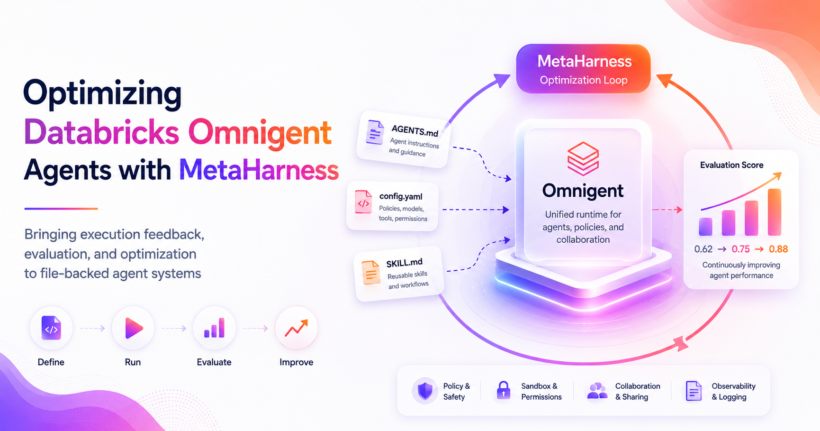
Databricks has just released the Omnigent the meta-harness for the AI agents. It is timely that Superagentic AI released meta-harness library few months ago. These meta-harness concepts sounds same but they serve different purpose. Agent development is moving up a layer. For the last few years, most agent work has focused on prompts, models, and tool calls. That is still important, but it is no longer the whole system. Real agent workflows now include harnesses, runtime policies, sandboxing, shared sessions, multiple models, skill files, approval gates, and evaluation loops.
That is why Omnigent is an important release. Omnigent is a meta-harness for AI agents. It gives developers a common layer over existing agents such as Claude Code, Codex, Pi, and custom agents. Instead of treating every agent harness as a separate silo, Omnigent provides a shared runtime layer for composition, control, and collaboration.
What Is Omnigent?
Databricks introduced Omnigent as an open source meta-harness for combining, controlling, and sharing agents. The basic idea is agent harnesses made models usable, but the next layer is the meta-harness, a layer above individual harnesses where teams can manage multiple agents, policies, sessions, and collaboration.
Omnigent focuses on three core ideas.
- Composition: use one common layer across multiple harnesses and models. You can switch between Codex, Claude Code, Pi, or custom YAML agents without rewriting the whole workflow.
- Control: enforce policies, approvals, cost limits, filesystem access, network access, and sandboxing outside the prompt. This matters because prompt-only safety is not enough for serious agent workflows.
- Collaboration: share live agent sessions through terminal, web, desktop, mobile, or APIs so teams can inspect, comment, and steer work together.
This is a different layer than a single coding agent. Omnigent is not just another assistant. It is infrastructure around agents. It wraps agent execution, gives it a common interface, adds policy and sandbox controls, and makes sessions shareable.
That matters because teams rarely use one model in one harness forever. They compare models. They combine agents, run subagents, need approvals, logs, durable sessions. They need to control what agents can read, write, and spend. Omnigent is designed for that world.
The Missing Piece: Optimization
Once agents become file-backed and declarative, a new question appears: how do you know the agent definition is good? This is where optimisation fits in in the launch blog post, they mentioned optimisation is on their roadmap to include automatic optimization at the meta-harness level with GEPA, code-based introspection within agents similar to MemEx and RLM, but he’s still not happened yet.
If your Omnigent agent is defined by files such as config.yaml, AGENTS.md, skills, policies, and sandbox declarations, those files become part of the system. They influence how the agent behaves just as much as a prompt does.
That creates practical questions:
- Is the agent instruction file specific enough?
- Does the sandbox allow the right files and block the wrong ones?
- Are the policies aligned with the task?
- Are skills useful, or are they vague placeholders?
- Can one agent configuration be measured against another?
- Can we improve the agent definition with evidence instead of intuition?
This is where MetaHarness fits. Superagentic AI belt Marta harness library few months ago to optimise the coding agents this library is perfectly fit to optimise the Omnigent as well.
What Is MetaHarness?
MetaHarness is an open source Python library for optimizing executable harnesses around agentic coding systems. It is inspired by the Meta Harness research direction, but it is built as a practical filesystem-first tool for developers. MetaHarness does not only optimize prompts. It optimizes the files and workflows around agents: instruction files, config files, setup scripts, validation scripts, test flows, skills, and policy definitions.
The loop is straightforward:
- Start from a baseline workspace.
- Create a candidate workspace.
- Ask a proposer backend to improve the candidate.
- Validate and evaluate the result.
- Store diffs, events, scores, ledgers, and artifacts.
- Keep the best candidate.
This makes agent improvement measurable. Instead of manually editing an agent config and hoping it is better, MetaHarness turns the harness into an experiment target.
MetaHarness 0.4.0 Adds Omnigent Support
We have released MetaHarness 0.4.0, now also available on PyPI. This release adds an experimental Omnigent backend.That means MetaHarness can now use Omnigent as a proposer backend. In practical terms, Omnigent can propose changes to a candidate workspace, while MetaHarness keeps the surrounding optimization loop: candidate workspaces, validation, scoring, diffs, ledgers, frontier selection, and result artifacts.
uv tool install superagentic-metaharnessOr, inside a Python project:
uv add superagentic-metaharnessHow The Integration Works
The new backend is called OmnigentCliBackend. It plugs into the same proposer protocol used by the rest of MetaHarness:
prepare(request) -> invoke(request) -> collect(execution)For each candidate, MetaHarness can generate an Omnigent agent bundle under the candidate workspace:
.metaharness/omnigent_agent/config.yamlIt also archives the generated config for review:
proposal/omnigent_agent.yamlA simplified generated config looks like this:
spec_version: 1
name: metaharness_candidate_proposer
instructions: .metaharness/AGENTS.md

executor:
  type: omnigent
  config:
    harness: codex

os_env:
  type: caller_process
  cwd: /absolute/path/to/candidate/workspace
  sandbox:
    type: darwin_seatbelt
    allow_network: true
    write_paths:
      - AGENTS.md
      - config.yaml
      - skills
One important detail is the working directory. The generated Omnigent config pins os_env.cwd to the absolute candidate workspace. That keeps the agent bundle separate from the workspace being optimized.
Policy And Sandbox Mapping
MetaHarness already supports allowed write scopes. With the Omnigent backend, those scopes can be translated into Omnigent sandbox configuration. For example, a MetaHarness project can define the files an agent is allowed to edit:
{
  "allowed_write_paths": [
    "config.yaml",
    "AGENTS.md",
    "skills"
  ]
}
The Omnigent backend maps those paths into the generated sandbox config and adds a sandbox enforcement policy:
policies:
  metaharness_enforce_sandbox:
    type: function
    handler: omnigent.policies.builtins.safety.enforce_sandbox
    factory_params:
      sandbox_type: darwin_seatbelt
      allow_network: true
      write_paths:
        - config.yaml
        - AGENTS.md
        - skills
This is a useful combination. Omnigent can enforce safety earlier during the agent run, while MetaHarness still validates the final candidate after the run finishes.
Using Omnigent As A MetaHarness Backend
A project can configure the Omnigent backend in metaharness.json:
{
  "backends": {
    "omnigent": {
      "omnigent_binary": "omni",
      "harness": "codex",
      "sandbox_type": "darwin_seatbelt",
      "allow_network": true,
      "no_session": false,
      "proposal_timeout_seconds": 300
    }
  }
}
Then run:
uv run metaharness run \
  examples/omnigent_agent_benchmark \
  --backend omnigent \
  --budget 1
This uses Omnigent to generate a candidate improvement, then MetaHarness validates and scores that candidate.
The Bigger Use Case: Optimizing Omnigent Agents
The most interesting long-term use case is not only using Omnigent to run a proposal. It is using MetaHarness to optimize Omnigent agents themselves. Omnigent agents are file-backed and declarative. That makes them a natural optimization target.
MetaHarness can optimize files such as:
config.yamlAGENTS.mdskills/*/SKILL.md- custom policy config
- sandbox declarations
- tool declarations
- subagent instructions
This creates a clean division of labor:
Omnigent runs and controls agents. MetaHarness measures and improves the files that define those agents.
A Real Smoke Test with Codex Harness
For the 0.4.0 release, we added a new benchmark:
examples/omnigent_agent_benchmarkThe baseline agent was intentionally minimal. It had a basic Omnigent config, a sparse instruction file, and a placeholder review skill. The benchmark asked MetaHarness to improve the agent definition.
We then ran a real Omnigent smoke test through the new backend. The result:
best_candidate_id=c0001
best_objective=0.875
scope_violation_paths=[]
The winning candidate changed only the intended files:
AGENTS.md
config.yaml
skills/review/SKILL.md
That is the behavior we wanted. Omnigent generated a useful candidate improvement. MetaHarness validated it, scored it, recorded the diff, and confirmed that the candidate stayed inside the allowed write scope.
What Changed In The Candidate?
The improved candidate made the agent more explicit and safer.
config.yamlwas updated with a stronger agent identity, an explicit instruction file, sandbox configuration, and policy shape.AGENTS.mdwas expanded with practical repository guidance, safe git behavior, and instructions to inspect MetaHarness artifacts.skills/review/SKILL.mdwas changed from a placeholder into a concrete review checklist focused on correctness, tests, security, and maintainability.
This is exactly the type of improvement that is hard to reason about from vibes alone. It is much better to score it with a repeatable benchmark.
What We Learned
The first real integration surfaced several useful engineering lessons.
- Omnigent expects agent bundles to be structured as directories with
config.yaml, not arbitrary one-off YAML files. - The generated
os_env.cwdmust point to the candidate workspace, not the generated agent bundle directory. - Runtime scratch files from Codex under Omnigent should not pollute candidate diffs, so MetaHarness now cleans private
.codex-tmpscratch before computing workspace changes. - In our local setup,
codex-nativerequiredtmux, so the verified smoke used Omnigent’scodexharness path. - The integration works best when Omnigent owns runtime execution and MetaHarness owns experiment structure, scoring, and artifact tracking.
Why Otimization Matters
Agent builders are going to need two layers. First, they need a runtime layer. That is what Omnigent provides: a common interface, shared sessions, policy enforcement, sandboxing, and collaboration across agent harnesses. Second, they need an optimization layer. That is what MetaHarness provides: a repeatable loop for improving the files that shape agent behavior.
Together, they form a practical workflow:
- Define an Omnigent agent in files.
- Run it through MetaHarness.
- Let an agent propose improvements.
- Validate and score the result.
- Keep the better candidate.
- Repeat with evidence.
This is useful because serious agent development is not only about choosing the best model. It is about improving the system around the model: instructions, tools, policies, skills, workflows, and validation.
Try It
Install the latest release from PyPI:
uv tool install superagentic-metaharnessOr upgrade an existing install:
uv tool upgrade superagentic-metaharnessRead the MetaHarness 0.4.0 release notes, browse the MetaHarness repository, and try the Omnigent backend with the example benchmark. To learn more about Omnigent itself, start with omnigent.ai and the Databricks launch post.
Closing Thought
Omnigent gives agent builders a portable runtime layer. MetaHarness gives that layer a feedback loop. That combination is the interesting part. Agents can now be composed, governed, shared, measured, and improved as file-backed systems. That is the direction agent engineering is moving, and MetaHarness 0.4.0 is a first step toward making Omnigent agents optimizable with evidence.