
SuperQode for macOS is a native Mac application, with its desktop interface written entirely in Swift using Apple’s SwiftUI and AppKit frameworks and native controls. It does not use Electron or a JavaScript framework for its interface. A bundled Python engine handles agent execution, so no separate Python installation is required. The app and its DMG installer are Developer ID signed and notarised by Apple, and you can download the macOS beta directly from our official website, with a SHA-256 checksum available to verify the installer. We plan to submit SuperQode to the Mac App Store once the required sandboxing and distribution work is complete; the signed, Apple-notarised DMG is available today.
In our previous announcement, we introduced SuperQode for macOS as a workspace for building with coding agents, reviewing their work and deciding what ships. Since then, we have expanded that foundation into an environment for developing agents, engineering their harnesses and improving how they work. SuperQode now brings together local model management, ACP, A2A and UHP connections, harness creation, recursive workflows, evaluation, optimization and a redesigned developer workspace. You can connect an existing coding agent, run a supported model on your Mac, develop a custom harness and compare its behavior before adopting a change.
Our ambition is straightforward: make SuperQode the development engine developers reach for when they want control over how their agents work. Choosing a model is one part of that experience. Designing, measuring and improving the system around it is where SuperQode goes further. The Mac app brings those activities into the same workspace as your conversations, code and terminal, so harness engineering can become part of everyday development rather than a separate experiment. This release is a public beta, and we are inviting developers to help shape it by bringing projects, trying different execution approaches and telling us what they need to trust the results.
Watch the product overview
The SuperQode macOS product demo walks through local-model coding, agent connections, threads, review, Harness Studio, evaluations and optimization, alongside the Super Agent preview and DS4 configuration. It shows how these capabilities fit together: begin with an existing agent, explore local inference or develop a harness of your own without moving between disconnected applications. The overview includes a live local Qwen task that reads a project file and runs six passing tests. Saved evaluation evidence and offline optimization practice are presented as separate examples, so viewers can distinguish an observed execution from a demonstration of the surrounding workflow.
Explore the macOS workspace, local-model coding, ACP, Harness Studio, evaluations, optimization, Super Agent preview and DS4 setup. Saved evidence and offline practice are identified separately.
Harness engineering beyond agent selection
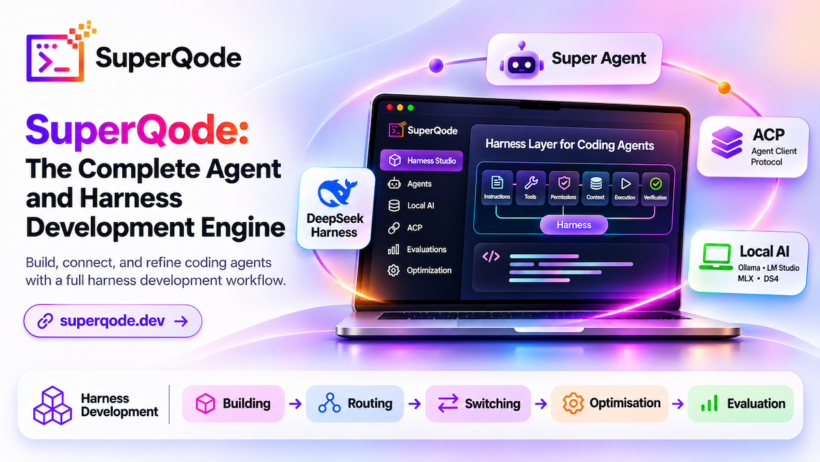
A coding agent’s behavior depends on more than its underlying model. Instructions, tools, permissions, context management and verification all influence whether it completes a task successfully. Together, these form its harness, and that harness deserves the same attention developers give to the software they build. It should be inspectable, configurable, versioned and tested. SuperQode makes harness engineering part of the development workflow through dedicated Studio, Evaluations and Optimization workspaces, with conversations, code changes and execution evidence accessible beside the work. You can start with an existing harness, adapt one to your project or develop your own; the Harness Hubprovides a starting point for exploring available approaches and their setup requirements.
Local AI as a first-class development workflow
Local AI is central to SuperQode. Developers should be able to choose models that fit their hardware, privacy preferences and workloads, then use them without assembling an entire development environment themselves. The Local AI workspace brings model discovery, compatibility information, downloads, server configuration and connection management into the macOS app. SuperQode integrates with Ollama, LM Studio, MLX, llama.cpp and DS4, with capabilities depending on the selected runtime and model format. You can inspect available models, review their requirements, configure supported context and cache settings, and manage a local server. Once ready, its model can be selected for a compatible harness in the same workspace used for your other agents.
Local models and harness development belong together. A model’s behavior changes with its instructions, tools and execution structure, so a local connection is only the beginning. SuperQode gives developers a place to explore those choices, inspect tool activity and evaluate whether a configuration suits their project. Local inference also makes a different deployment choice possible: keep model execution on your own Mac when the selected workflow supports it. Remote agents, providers and other connected services still have their own data boundaries, which remain part of the configuration you choose. The goal is practical control over the model and the workflow, with enough visibility to understand what is running.
New DS4 support for DeepSeek local inference
This release adds a native configuration interface for DS4, extending SuperQode’s local inference options. Developers with a compatible installation and GGUF weights can select their ds4-serverexecutable, choose the model file, configure the context window and set disk-backed KV cache options. SuperQode presents the configuration for review before starting the server, checks readiness and makes the connection available to a supported harness. It also distinguishes a server it started from an existing external process, keeping lifecycle ownership explicit. DS4 installation and model weights are separate setup steps, and hardware requirements depend on the chosen model. This release adds configuration and lifecycle support; it does not claim a measured DeepSeek coding-performance advantage.
ACP: connect your existing coding agents
Developers already have agents, subscriptions and preferred tools. SuperQode works with those choices through compatible integrations, including the Agent Client Protocol. The Connect experience includes a searchable ACP catalog, setup guidance, connection details and diagnostics. Harness identities remain visible throughout the workspace, with available vendor logos helping developers recognize the agent handling each conversation. Depending on the agent, authentication may use an existing subscription, provider credentials or another supported setup, while local connections remain available through compatible harnesses. SuperQode provides a consistent workspace without assuming every agent behaves identically: tools, permissions and supported controls remain backend-specific, and unsupported controls are hidden and rejected by the engine.
Protocol interoperability: ACP, A2A and UHP
SuperQode connects through ACP, A2A and UHP, giving developers more ways to work with agents and complete harnesses. ACP connects compatible coding agents to the workspace. Agent2Agent (A2A) provides a connection path to agents that advertise their capabilities through an Agent Card, allowing work to be submitted to a compatible service. Unified Harness Protocol (UHP) connects to a server that advertises a harness catalog, lets developers select an available harness and carries task progress and results back to the client. These connections extend the choices available alongside local harnesses and direct model providers, with operations determined by the selected agent or server.
Interoperability also makes SuperQode useful beyond its own interface. Through the CLI, developers can expose a configured SuperQode harness over supported protocol adapters, including A2A and UHP, so compatible clients can use it. A native UHP server exposes one configured harness; a connected UHP service may advertise several. The aim is a workspace that can participate in a wider agent ecosystem: connect an agent, call a remote service or make a harness available to another client. Authentication, session support, cancellation and execution location depend on the chosen connection, so a protocol connection does not imply identical capabilities or automatic access to your local project.
Harness Studio: build and version your own harness
Harness Studio provides a dedicated environment for creating and refining harness definitions. You can load a definition, edit its configuration, validate it and save revisions, preserving how it changes and making earlier configurations available for inspection. A harness becomes a development artifact rather than a prompt copied between conversations. Its instructions, model selection and execution settings can evolve deliberately, with a history developers can review before using a revision. Studio validation identifies configuration problems, while supported checks offer a bounded way to exercise behavior. Those checks help during development; broader comparisons belong in Evaluations, where baseline and candidate results can be examined together against tasks that represent the work you want the harness to perform.
Recursive workflows: move coordination into the harness
Developers should not have to direct every intermediate step of an agent’s work. As tasks grow, repeatedly supplying context, dividing work and rewriting prompts becomes a coordination burden of its own. SuperQode’s native RLM harness provides an approach to recursive workflows, with context handled as data, bounded subcalls and configured execution policies. Recursive prompting requires decisions about what to delegate, which context to pass, what tools to expose and when execution must stop. Our direction is to help developers define the workflow, evaluate its behavior and improve it, reducing the need to supervise every prompt. Recursive execution still needs limits and verification; those concerns belong in the harness engineering process rather than being left implicit in a conversation.
Super Agent: turn an objective into a harness proposal
Super Agent is a preview of a more guided approach to harness development. Developers can describe what they want to build and receive a proposed configuration that includes the selected provider and model, giving the review a concrete execution target. The workflow is deliberate: draft, review, save, then explicitly enable. A proposal remains something a developer inspects and adopts, with saved revisions preserving that decision. The current preview generates a harness using builtin tools with recursion disabled; it does not execute recursive child agents. Its optional Monty check produces a template, and Monty is not bundled with the app. Super Agent establishes the reviewed proposal workflow, while the separate RLM harness provides a recursive execution option with its own requirements.
DeepSeek Harness: explore another execution architecture
The optional DeepSeek Harness integration brings another execution approach into SuperQode’s ecosystem. The DeepSeek Harness project reflects an important principle: tool use, context handling and the agent loop are engineering choices alongside model selection. SuperQode provides an integration path while keeping its responsibilities distinct from DS4 inference, RLM and Super Agent. DS4 serves a model locally, DeepSeek Harness supplies an execution backend, RLM supports recursive workflows and Super Agent proposes reviewed configurations. The value of a shared workspace is being able to explore these approaches without confusing their capabilities or treating them as interchangeable implementations.
Harness evaluation: compare behavior before adoption
Changing a prompt or harness configuration is easy; establishing that it helps requires evidence. SuperQode’s Evaluations workspace compares a baseline with up to eight explicitly selected candidates, bringing task outcomes, grading information and available execution evidence into one review. Developers can also inspect timing and reported usage or cost where the backend supplies them. Held-in and held-out task arrangements support a more disciplined comparison than repeatedly adjusting a harness against the same examples, while project experiment history makes earlier results available without launching another run. A candidate should earn adoption through relevant results. The saved policy-and-format comparison in the product overview illustrates that review workflow; it is a small example, not a broad coding benchmark.
Harness optimization: propose, measure, review and improve
The Optimization workspace extends the process from comparing configurations to developing proposed improvements. Supported workflows let developers configure budgets, prepare optimization work and inspect staged candidates, with differences and evaluation evidence available before adoption. Optimization becomes an engineering loop: propose, measure, inspect and decide. Lower reported cost, faster execution or a shorter configuration may be valuable, but each needs to be considered alongside the quality of the result. Developers should be able to improve the harness surrounding an agent rather than changing models whenever a workflow struggles. The broader SuperQode documentation covers evaluation, benchmarking and optimization workflows; the overview includes configuration screens and a labelled offline practice round, which demonstrates the interface without implying a completed live optimization experiment.
AWS Strands: expand your runtime choices
SuperQode includes an optional integration with AWS Strands, expanding the execution approaches available to developers. The Strands Harness integration uses a separately installed runtime and connects supported providers to a governed tool surface for reading, writing, editing and running commands. Provider options depend on configuration and can include Amazon Bedrock, Anthropic, OpenAI, Google, Ollama and LiteLLM. The adapter has a defined scope and does not expose every upstream capability, so developers should inspect its setup and supported behavior before choosing it. The goal is consistent across integrations: make useful runtime choices available in an environment where developers can configure them, observe their work and review their output.
A native Mac workspace built around active work
Harness engineering needs an interface developers can stay in throughout the day. This release organizes SuperQode around active work, with a full-height thread list, persistent conversation tabs and visible harness identities. Search and status filters help developers find what is working, what needs attention and what they have pinned, while open tabs keep current tasks accessible. The conversation has more room by default: Agent Activity starts collapsed, animated Working text and the moving bar remain visible during execution, and the right-hand inspector opens on request. Harness Studio, Super Agent, Evaluations, Optimization, Local AI and Tools stay reachable by name, making the product’s capabilities discoverable without filling the conversation with permanently open panels.
Task controls, context and isolated drafts
For supported backends, the composer provides Code, Plan and Chat alongside Ask, Auto-edit and Full, communicating both intent and the autonomy being granted. Unsupported controls are hidden and rejected, while Full resets to Ask for the next new conversation. File mentions and image attachments make it easier to supply context without leaving the composer, with attachment staging associated with its intended draft even when preparation finishes after a conversation switch. An unsent draft can also move into an isolated Git worktree, carrying the prompt, images and available files while preserving source-only files and unrelated drafts. When the engine is offline, sending is blocked and the draft remains available.
Review changes, verify results and keep work traceable
SuperQode keeps review and verification close to the conversation. Developers can inspect diffs, review feedback, stage changes and run checks in the terminal, using a compact change summary for an overview or the fuller Review workspace for closer inspection. Files, Terminal, Tasks and Checkpoints remain accessible without abandoning the active thread, and the interface distinguishes turn-associated changes from broader project changes. Conversations can continue with another agent, reviewed context can be shared between threads, and All work and available external history help developers find activity across projects. Recovery and background-engine settings support continuity between sessions, while theme choices and command navigation let developers shape the workspace around their habits.
Tools, integration surfaces and release confidence
The Tools workspace brings additional configuration and workflow surfaces into the app, including available interfaces for MCP, skills, memory, work orders and SuperGauge. Developers can inspect the components surrounding an agent and decide which integrations belong in their workflow. Quality evidence remains part of this direction: existing verification tools and records provide a foundation, while the Pro section previews the commercial release-confidence experience we are developing. That preview does not imply hosted verification, signed quality records or team approval services have shipped. Teams interested in shaping the experience around their own release decisions can explore the SuperQode design-partner program and discuss the evidence they need before approving agent-written software.
Try the SuperQode macOS beta
SuperQode for macOS is available as a public beta for Apple Silicon Macs running macOS 14 or later. This release is 0.3.3, build 19, alongside Python package 2.31.2; the Mac app includes its Python engine. Download the signed, notarized app, open an existing project and connect a compatible agent. From there, explore a local model, create a harness definition or compare configurations against tasks you understand. Watch the product overview, browse the documentation and share feedback through GitHub issues. Tell us where the experience helps, where it gets in the way and what evidence you need before trusting an agent’s output.
This is just the beginning
We are building toward a development environment where local models, existing coding agents and custom harnesses work within the same inspectable workflow. Developers should be able to choose an execution approach, measure its behavior and improve it without rebuilding their workspace around every new agent. Our next direction includes deeper local workflows, stronger evaluation and optimization, and mobile access. By the end of 2026, our ambition is to make SuperQode the most useful agent and harness development engine a developer can choose. That is the standard we are working toward, and the beta is an invitation to help shape it. Try SuperQode, bring a project and tell us what would make it your daily workspace.