
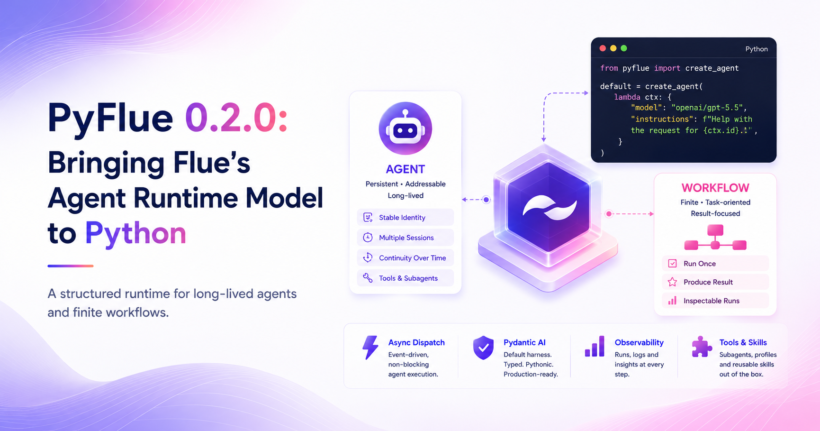
PyFlue 0.2.0 is now available. This release is a major step toward parity with the TypeScript Flue framework and introduces a clearer runtime model for building production-oriented Python agents. The main theme of this release is structure. PyFlue now separates long-lived agents from finite workflows, adds persistent agent instances, introduces asynchronous dispatch, improves observability, and makes Pydantic AI the default harness backend.
PyFlue remains focused on Python teams that want framework-level ergonomics for agents while keeping access to the Python ecosystem, Pydantic models, Python deployment targets, and familiar server infrastructure.
Agents and Workflows
The largest change in PyFlue 0.2.0 is the adoption of the Flue agents and workflows architecture. An agent is a persistent, addressable runtime boundary. It is useful when you want one identity to keep working over time, such as a support assistant for a ticket, a coding assistant for a repository, or a chat assistant for a thread. A workflow is a finite unit of work. It runs once, produces a result, and has a workflow run id that can be inspected through run APIs and logs.
  from pyflue import create_agent

  default = create_agent(
      lambda ctx: {
          "model": "openai/gpt-5.5",
          "instructions": f"Help with the request for instance {ctx.id}.",
      }
  )
  from pyflue import FlueContext, create_agent

  agent = create_agent(lambda ctx: {"model": "openai/gpt-5.5"})


  async def run(ctx: FlueContext) -> dict:
      harness = await ctx.init(agent)
      session = await harness.session()
      response = await session.prompt(ctx.payload["text"])
      return {"summary": response.text}
This gives application authors a clearer way to choose the right abstraction. Use agents when identity and continuity matter. Use workflows when the unit of work is bounded and result-oriented.
Persistent Agent Instances
PyFlue agents are now addressable through stable instance ids.
POST /agents/{name}/{id}
The {id} value identifies the continuing agent instance. It can represent a customer, repository,
ticket, chat thread, or any other application-defined boundary.
Each instance can maintain separate sessions. This lets applications model long-running interaction without
inventing their own session layer around the agent runtime.
Persistent agents can be used over HTTP, Server-Sent Events, and WebSocket connections. The Python client also
includes agent helpers for invoking and connecting to deployed agents.
Asynchronous Dispatch
PyFlue 0.2.0 adds dispatch() for asynchronous agent input. This is useful when an application receives an event but should not keep the inbound request open while the model works. Common examples include webhooks, queue messages, issue comments, and chat events.
from pyflue import dispatch
  from src.agents.support_assistant import default as support_assistant


  async def accept_comment(event):
      return await dispatch(
          support_assistant,
          id=event["customer_id"],
          session=event["case_id"],
          input={
              "type": "support.comment.created",
              "text": event["text"],
          },
      )
dispatch() returns a receipt once the input has been accepted. The agent processes the input through its own session and tools. For production systems, dispatch should be placed behind a durable application queue when accepted work must survive restarts. The current Python dispatch path uses process-memory admission, which is appropriate for local development and simple deployments, but not a replacement for durable message delivery.
Pydantic AI Is Now the Default Harness
PyFlue 0.2.0 makes Pydantic AI the default harness backend. This means a default PyFlue install now uses a typed, model-agnostic Python agent loop without requiring LangChain or LangGraph. DeepAgents remains supported, but it is now optional:
pip install "pyflue[deepagents]"
Then select it explicitly:
agent = await init(harness="deepagents")
This change keeps the default dependency footprint smaller and better aligned with Python users who want Pydantic-first agent development.
Better Tooling and Customization
This release adds several improvements for defining agent behavior and capabilities.
Agent Profiles
Reusable profiles let teams share model-facing behavior across agents, workflows, and subagents.
from pyflue import define_agent_profile

  reviewer = define_agent_profile(
      {
          "name": "reviewer",
          "model": "anthropic/claude-sonnet-4-6",
          "instructions": "Review the change and report evidence-backed findings.",
      }
  )
Profiles can define models, instructions, tools, skills, subagents, reasoning effort, and compaction behavior.
Subagent Profiles
Agents can now delegate focused work to declared subagent profiles. This supports patterns such as review agents, research agents, data analysis agents, and scoped coding assistants.
Packaged Skills
load_skill(path) imports an Agent Skills compatible SKILL.md file as a reusable skill object. This improves the path for packaging skills with applications rather than relying only on workspace- discovered skills.
Local Sandbox
The new host local() sandbox gives agents controlled access to the host filesystem and subprocess shell. This is useful in CI runners, local automation, and trusted environments where the host itself is the isolation boundary. Remote sandbox adapters remain available for Daytona, E2B, Modal, and Runloop.
WebSocket Support
PyFlue now supports WebSocket surfaces for both agents and workflows. Persistent agents can use WebSockets for multi-prompt sessions over one connection. Workflows can use WebSockets for one invocation that streams events and returns the final result.
async with client.agents.connect("assistant", "thread-123") as conn:
      first = await conn.prompt("Summarize the context.")
      second = await conn.prompt("Draft a reply.")
async with client.workflows.connect("summarize") as conn:
      messages = await conn.run({"text": "..."})
Observability and OpenTelemetry
PyFlue 0.2.0 adds a more complete event model and an OpenTelemetry adapter. Agent operations, workflow runs, model generations, tools, tasks, and compaction events can now be correlated through structured events. The OpenTelemetry adapter maps these events to spans, including model and token usage metadata.
from pyflue import create_opentelemetry_observer, init

  agent = await init(
      on_event=create_opentelemetry_observer(),
  )
This makes it easier to inspect what agents are doing in production, including which operations ran, which tools were called, and how model usage accumulated.
Client Improvements
The Python client now mirrors more of the Flue SDK structure. It includes namespaces for agents, workflows, runs, and admin APIs. Persistent direct agent calls return result envelopes. Workflow invocations return run ids that can be inspected through run APIs. This distinction is important. Runs belong to workflows. Direct persistent agent prompts continue sessions and do
not create workflow runs.
Improved Project Layout
New projects use the src/ layout by default:
AGENTS.md
  pyflue.toml
  .agents/
    roles/
    skills/
  src/
    agents/
      assistant.py
    workflows/
      summarize.py
PyFlue still supports legacy file-based handlers, root-level agent files, and .pyflue or.agents locations, but src/agents and src/workflows are now the canonical layout.
Documentation and Parity Tracking
The release includes expanded documentation for agents, workflows, tools, subagents, models and providers, chat integrations, production guidance, observability, client usage, and Flue parity. A new parity reference page documents what PyFlue implements relative to the TypeScript Flue framework, what is intentionally not ported, and where Python-specific design choices differ. The main intentionally unported area is Cloudflare-specific runtime behavior, such as Durable Object backed execution recovery and Cloudflare-native runtime integration. PyFlue provides Python-native alternatives where practical, while keeping Cloudflare-specific internals out of the core Python runtime.
Breaking Changes
There are two important breaking changes in PyFlue 0.2.0.
- Runs are now workflow-only. Direct and dispatched persistent agent prompts no longer create workflow runs or
surface run ids. They correlate by agent instance, session, and operation. - DeepAgents is no longer the default harness and is no longer installed as a core dependency. Projects using
DeepAgents should install the optional extra and select the backend explicitly.
pip install "pyflue[deepagents]"
agent = await init(harness="deepagents")
Installing PyFlue 0.2.0
Install with pip:
pip install pyflue
Or with uv:
uv add pyflue
Optional extras include:
  pip install "pyflue[deepagents]"
  pip install "pyflue[otel]"
  pip install "pyflue[sandboxes]"
  pip install "pyflue[monty]"
Or use equivalent uv commands to add it to your projects.
Looking Ahead
PyFlue 0.2.0 establishes the framework shape for Python agents: persistent agents, finite workflows, typed outputs, skills, tools, sandboxes, observability, and deployment paths. The next areas to watch are production durability for dispatched input, deeper provider and model routing, and continued parity review against the TypeScript Flue framework. For now, this release gives Python teams a stronger foundation for building agent systems that are structured, observable, and easier to deploy.
Learn more about PyFlue on GitHub, read the PyFlue documentation, or visit the Flue framework website.