
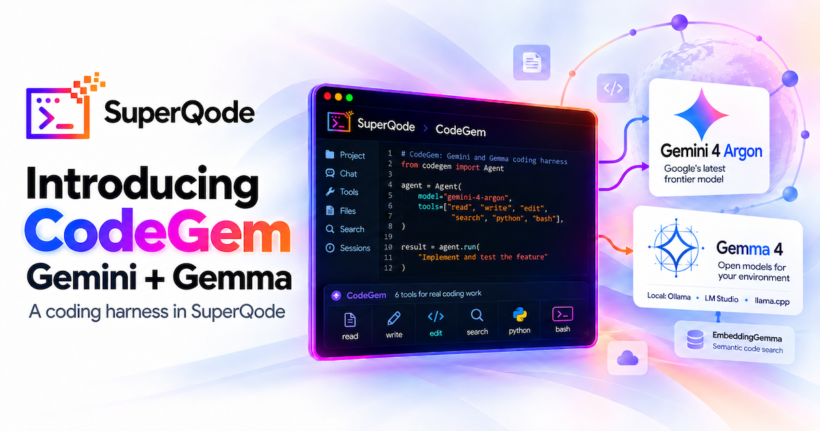
Google offers Gemini CLI and Antigravity, while our work called for a focused coding interface we could tune for Gemini and carry into local Gemma sessions. We have been building CodeGem toward that goal while waiting for the next major Gemini release. With Gemini 4 Argon now announced, we are releasing CodeGem as a native SuperQode harness: six coding tools, Gemini-native conversations, local Gemma through Ollama, LM Studio and llama.cpp, and optional semantic search with EmbeddingGemma.
Why we built CodeGem
Evaluating a model becomes harder when tool schemas, project instructions, command output and conversation handling change between runs. We wanted a harness we could inspect and improve alongside the Google model families, then reuse when moving from an API session to a developer’s machine. CodeGem builds on the file operations and durable coding-session loop used by PiPy, adding its own model adapters, retrieval and execution tools. Gemini and Gemma share the coding workflow while retaining their provider formats and capabilities; SuperQode supplies the terminal, configuration and session integration.
Six tools for inspecting, changing and checking code
CodeGem exposes exactly six tools to one coding agent: read, write, edit, search, python and bash. The file tools support paginated reads, file creation and precise replacements. Search handles file discovery, ripgrep matching and optional semantic retrieval within the same tool. Python supports calculations and programmatic checks; Bash runs builds, tests and project commands. Calls execute in sequence after the provider response has been validated, so dependent operations receive earlier results before proceeding. Python runs in a fresh subprocess using SuperQode‘s interpreter, and Bash receives that interpreter on its command path, keeping commands such as python -m pytest consistent.
Project guidance comes from AGENTS.md and GEMINI.md along the ancestor path, with a 32 KB limit per file. Commands default to a 60-second timeout, support up to 300 seconds and return the last 16,000 bytes of output, retaining larger logs in a temporary file. POSIX cancellation and timeout handling terminate the process group. Tools run with SuperQode‘s host permissions, without an OS sandbox or interactive approval prompts; developers should choose the execution environment according to the access their task requires.
Gemini-native conversations and Gemini 4 Argon
Gemini uses Google’s native GenerateContent API through direct HTTP requests, requiring an API key without an additional Google SDK. CodeGem preserves response parts, their ordering, function-call identities and opaque thought signatures through tool exchanges and disk resume. A resumed session retains the native relationship between a tool request and its result. Changing models requires a fresh conversation so signed history stays associated with the model that produced it. Interrupted mutations are recorded as uncertain, prompting the model to inspect the current files before retrying an operation whose result was lost. Responses are buffered before their text and tool events appear in the terminal.
We added gemini-4-argon to the Google catalog and terminal choices after discovering it through the API and testing coding tasks with an account that had access. Its metadata reported a 1,048,576-token input limit and a 32,768-token output limit. Google’s announcement describes a phased rollout, so availability and limits should be checked for each account. Gemini 4 keeps the API’s default thinking behaviour unless native controls are supplied. Usage reporting includes prompt, generated, cached and thinking tokens, with thinking tokens included in estimated output cost; Google’s billing record remains the source for charged usage.
Local Gemma through Ollama, LM Studio and llama.cpp
Gemma uses Ollama’s native chat API or the OpenAI-compatible endpoints from LM Studio and llama.cpp. Automatic mode checks Ollama’s advertised tool capabilities, using native calls when supported and validated JSON tool responses otherwise. LM Studio and llama.cpp start with native calls and can fall back to JSON after an explicit tool-template rendering failure; other server errors remain visible. Developers can set tool_mode: native or tool_mode: json explicitly. The adapters preserve tool-call identities, and thinking and system-role defaults follow the Gemma generation.
Local context defaults account for memory use. Gemma sessions are capped at 32,768 context tokens by default, including imported models outside the catalog. Output allowance is the smaller of 8,192 tokens and one quarter of the configured context, with bounded compaction reserves and retained recent history. Developers can increase the context explicitly when their hardware has room for the weights, runtime buffers and KV cache. These defaults give local sessions a practical starting point while leaving larger configurations available for evaluation.
The cross-platform starting model is gemma4:12b; Apple Silicon users can choose an MLX-specific tag when their Ollama installation offers it. We also tested the same Gemma 4 26B-A4B QAT Q4_0 artifact across all three servers. The packaged download helper supports resumable transfers, verifies SHA-256 checksums and supplies an Ollama Modelfile. That GGUF is approximately 14.4 GB, so disk space and serving-runtime settings remain part of model setup.
Local semantic code search with EmbeddingGemma
CodeGem can find implementations from descriptions of behaviour, such as where authentication happens or how a pricing rule is applied. Optional local EmbeddingGemma retrieval returns source excerpts with file paths and line references through the existing search tool. The Git-aware index respects ignore rules and accepts individual files or multiple source directories. Python files are chunked around functions where possible; other supported files use overlapping line windows, with bounded chunks and a 10,000-chunk maximum.
Vectors and references are stored in SQLite under .superqode/codegem. The default is 256 dimensions, with 128, 512 and 768 also supported. Content hashes reuse embeddings for unchanged chunks, and updates commit after successful embedding batches. Retrieval combines semantic similarity with lexical matches and selects the strongest chunk from each source file. Before returning an excerpt, it verifies the source against the stored content, excluding stale chunks, deleted files and paths that now resolve outside the project.
The Sentence Transformers encoder automatically selects CUDA, Apple Metal through MPS, then CPU, with an explicit device override available. Loading and inference run in a worker thread to keep the terminal responsive, and local_files_only supports cached weights offline. Ollama or a compatible loopback server can also provide embeddings when it supports the selected model. Indexing and embedding stay on the machine. In a Gemini coding session, the prompt and selected tool results still travel to Google’s API.
CodeGem in the terminal and session workflow
CodeGem sits alongside Core, RLM, PiPy, Workbench and SystemOne in SuperQode‘s connection menu. Enter :connect harness-codegem, then choose Local for Gemma through Ollama, LM Studio or llama.cpp, or BYOK for Gemini through Google. Supported provider and model choices are filtered, and the replacement connection is validated before activation. The status bar identifies the harness, cancellation reaches the active session, and source-view reading positions survive reloads, theme changes and resizing. Image attachments are supported through Gemini and Ollama when the model supports vision. Conversations are saved under .superqode/codegem/sessions/, and terminal and headless execution share the same backend, with command-line continuation available through --session.
What we measured
We tested repair, file creation and a multi-file discount feature against unchanged reference tests. Gemini 4 Argon completed those tasks in 11.99, 14.34 and 17.95 seconds respectively, with the checks passing. A separate disk-resume test continued saved signed history in a new backend instance and recalled an earlier marker. Installing the built wheel outside the source checkout also passed the six-test multi-file task, exercising the packaged workflow as well as the source implementation.
Local trials used an Apple M4 Max with 128 GiB of unified memory. Gemma 4 12B MLX through Ollama, with thinking off, passed repair in 20.27 seconds and creation in 39.20 seconds. The 26B-A4B Q4 model through Ollama, with thinking on, passed repair, creation and the multi-file task in 18.52, 9.38 and 33.43 seconds. The same Q4 artifact passed repair and creation through LM Studio in 8.97 and 7.35 seconds, and through llama.cpp in 13.72 and 12.42 seconds. These are individual compatibility measurements with different runtime settings, including task execution and any warmup or retries.
Local EmbeddingGemma ran on Apple Metal, and all six labeled queries in a 1,800-chunk index ranked the expected file first. The full Python 3.13 suite passed 6,858 tests with 54 skipped, alongside checks covering Python 3.12, terminal selection, cancellation, images, provider history, context budgets and packaging. The validation runner protects the original reference tests and bounds execution. These results establish compatibility under the tested conditions. We still need repeated measurements, broader model comparisons and physical hardware trials on CPU and CUDA.
Try CodeGem
Install SuperQode with the official installer and open it in your project. Local Gemma needs a serving runtime with the chosen model loaded; the search and shell tools require ripgrep and Bash. Make the project’s test dependencies available so the agent can run its checks in the intended environment:
curl -fsSL https://superqode.dev/install.sh | sh
cd your-project
superqode
Use :connect harness-codegem for the terminal flow, or select the provider directly from the command line. Keep the Google key in the environment and start a fresh conversation when changing models. These examples show a local task and an Argon task:
ollama pull gemma4:12b
superqode harness run codegem \
  "Read the failing test, fix the implementation, and run the project checks" \
--provider ollama --model gemma4:12b --working-dir .export GEMINI_API_KEY="your-api-key"
superqode harness run codegem \
"Inspect this project and implement one small, tested improvement" \
--provider google --model gemini-4-argon --working-dir .For local semantic search, run the installer with SUPERQODE_EXTRAS=semantic-local to add the direct embedding encoder to the same SuperQode environment. Choose an existing source directory for --scope, and keep provider, model, dimensions and scope aligned with the harness configuration. The packaged index command lets you inspect retrieval before the agent uses it:
curl -fsSL https://superqode.dev/install.sh | SUPERQODE_EXTRAS=semantic-local sh
superqode-codegem-index . --provider sentence-transformers \
  --model google/embeddinggemma-2 --scope src
superqode-codegem-index . --provider sentence-transformers \
  --model google/embeddinggemma-2 --scope src \
  --query "where is request authentication handled?"
Save this as codegem-search.yaml to enable local embeddings in the agent’s search tool. Change scopeto match your project. Both the index and model-download helpers are included in the installed package:
version: 1
name: codegem-search
inherits: codegem
runtime:
  config:
    embedding:
      provider: sentence-transformers
      model: google/embeddinggemma-2
      device: auto
      dimensions: 256
scope: [src]superqode --harness codegem-search.yaml \
--provider google --model gemini-4-argonIn the TUI, ask the model to use search with semantic=true and show the matching file and line before reading the implementation. Our launch demonstration follows this workflow inside the terminal: Gemini 4 Argon first, a local Gemma model answering the same project question, then semantic retrieval with local EmbeddingGemma. The video shows the model choices, source inspection and search results so developers can repeat the sequence in their own repositories.
Watch Demo
Watch CodeGem inside the SuperQode terminal, starting with Gemini 4 Argon and continuing with a local Gemma model on the same project. The walkthrough also demonstrates semantic code search with local EmbeddingGemma, returning the matching implementation with its file path and line number. You can also watch the demo on YouTube.
Release notes and links
CodeGem brings six coding tools, native Gemini history, local Gemma adapters, EmbeddingGemma retrieval and the SuperQode terminal together in one harness. The complete changes are in the release notes, the package is on PyPI, and the product and documentation are available through superqode.dev. Try a small task from your project and share the model, runtime and checks used to evaluate it.
P.S: Originally posted on the Superagentic AI blog here