
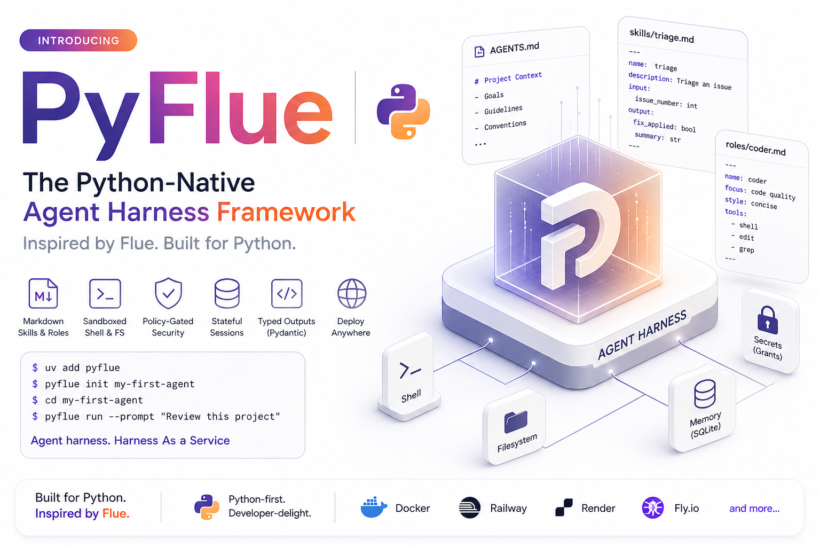
The CEO of HTML, Fred Schott released Flue , the TypeScript community quickly recognized its significance. A true agent harness framework with Markdown-driven skills, headless and programmable design, zero-config sandboxing, and seamless deployment felt like the missing piece for building autonomous agents.
Python has already strong ecosystem of the even better but everything is DIY. Flue just gave the better DX and Philosophy and baked entire harness as service for agent builders. Its mainly built for the TypeScript ecosystem but ideas is strong. Usually, TypeScript ecosystem port all the major AI/ML libraries but it’s a time to port the great idea coming from Typescript into Python. So, here is PyFlue
PyFlue is now available as the complete Python-native port of Flue. It delivers the same low-boilerplate, Markdown-first developer experience while leveraging Python’s mature ecosystem for typed outputs, secure sandboxes, and flexible deployment. It also adds several production-ready capabilities that go beyond the original vision.
Harness Moment
Flue is not another AI SDK or chat wrapper. It is a framework built around a built-in agent harness. As Fred explained in the launch thread, the harness is the defining characteristic that turns a simple script or chatbot into a true autonomous agent. The many people from the LangGraph and other communities welcomed this idea and appreciated the efforts.
TypeScript developers are excited because Flue feels like Claude Code, autonomous, low-code, and powerful but without the TUI or GUI assumptions. It is headless, programmable, and deployable anywhere. Most logic lives in Markdown files (skills, roles, and AGENTS.md). The framework handles sessions, sub-agents, sandboxing, and deployment so developers can focus on outcomes instead of wiring graphs or loops.
How Flue Differs from Existing Python Tools
The Python ecosystem already has strong agent primitives. LangGraph provides powerful stateful graphs and checkpointers. DeepAgents (LangChain’s higher-level harness) adds planning, filesystem backends, and sub-agents on top of LangGraph. Other options such as CrewAI, PydanticAI, OpenAI Agents SDK, and Google ADK offer structured tools, multi-agent orchestration, and typed outputs.
Flue is different in three key ways that make the framework moment feel fresh:
- Framework with strong conventions instead of a flexible library or SDK. Flue ships a complete runtime with first-class concepts such as session, skill, subagent, and built-in sandbox. You write minimal code and run flue runor flue build. LangGraph and even DeepAgents require more assembly to achieve the same harness. Flue is closer to Astro or Next.js than to a React component library.
- Markdown-first developer experience with zero-config sandbox. Most agent logic lives in simple .md files with YAML frontmatter for schemas. The virtual sandbox (just-bash style) gives agents immediate filesystem and shell access without extra configuration. Python tools offer similar pieces, but they are not integrated as seamlessly or with the same low boilerplate.
- Headless, runtime-agnostic deployment. Flue agents run anywhere, Node.js, Cloudflare, CI/CD pipelines without baked-in assumptions about human oversight. Python frameworks can achieve this, but Flue makes the entire workflow feel opinionated and delightful from the first line.
In short, Flue raises the bar from “build your own harness” to “use the harness.” PyFlue brings this exact philosophy to Python while adding capabilities that fit the ecosystem naturally.
What PyFlue Is
PyFlue is a Python-first agent harness framework for building autonomous agents. It supports Markdown skills, persistent sessions, sandboxed filesystem and shell access, typed Pydantic outputs, streaming events, file-based webhook routing, and pluggable backends. DeepAgents is the default harness, with support for OpenAI Agents SDK, Google ADK, PydanticAI, and custom implementations.
Agents = Model + Harness + Memory + Secure Sandbox.
Core Features
- Markdown Skills and Roles Define reusable workflows in .agents/skills/*.md with YAML frontmatter for input and output schemas. Global context lives in AGENTS.md. Scoped behavior comes from .agents/roles/*.md files. Apply roles easily:
result = await session.prompt("Review this patch", role="coder")- File-Based Routing and Triggers Place Python files in the agents/ directory to create webhook routes automatically. Triggers support webhook and schedule metadata for external schedulers.
- Stateful Sessions and Tasks Sessions persist with SQLite by default and support stable IDs for resumption. Tasks create focused child agents with isolated history but shared sandbox.
- Policy-Gated Sandbox The default virtual sandbox provides controlled access to read, write, edit, grep, glob, and shell commands. Policies enforce safety with allow_write, allow_shell, and command allowlists. Secret grants pass credentials only for specific calls without exposing them to the model. Remote sandboxes (Daytona, E2B, Modal, Runloop) are supported via extras.
- Typed Outputs and Streaming Every skill or prompt accepts a Pydantic model for validation. Streaming works in Python, the CLI, and SSE endpoints.
- CLI and Deployment The pyflue CLI mirrors Flue’s workflow with commands for init, run, dev, build, and deploy across Docker, Railway, Render, Fly.io, Vercel, Netlify, Cloudflare, and CI templates.
- Pluggable Harnesses DeepAgents is the default. The backend registry lets you swap harnesses without changing agent code.
- Monty Support: The Pydantic Monty is already supported for Python backend.
PyFlue vs Flue
PyFlue preserves Flue’s core strengths while adding Python-specific advantages:
- Markdown skills plus roles for enhanced reuse
- Virtual sandbox with explicit policies and secret grants
- File-based webhook routing with automatic endpoints
- Pydantic typed outputs
- Extensive deployment targets and CLI tools
Python teams gain deep integration with data and ML libraries without sacrificing Flue’s delightful developer experience.
Quickstart in 30 Seconds
uv add pyflue
pyflue init my-agent
cd my-agent
pyflue run --prompt "Review this project"
A minimal agent looks like this:
from pydantic import BaseModel
from pyflue import init

class FixResult(BaseModel):
    fix_applied: bool
    summary: str

async def main():
    agent = await init(
        model="openai:gpt-5.5",
        harness="deepagents",
        sandbox="virtual",
        allow_write=True,
        allow_shell=True,
    )
    session = await agent.session("fix-123")
    result = await session.skill(
        "triage",
        args={"issue_number": 123},
        result=FixResult,
    )
    if result.fix_applied:
        await session.shell("git status --short")
Who Should Use PyFlue
Use PyFlue if you are a Python-first team building coding agents, issue triage systems, data analysis agents, or workflow automation that needs controlled file and shell access. It is ideal for developers who appreciate Flue’s low-boilerplate approach but prefer to stay in Python for its rich libraries and mature tooling.
Get Started Today
PyFlue is open source and ready for use. Visit the GitHub repository or the documentation site to explore the full feature matrix and concept guides.
Website : PyFlue
uv add pyflue
pyflue init my-first-agentWe look forward to seeing what you build. Star the repository, contribute skills or roles, or share your agents with the community.
The agent harness moment has arrived for Python. Welcome to PyFlue.